🔑 Roles and Permissions
The iXR Platform supports two levels of permissions:
- Company-Level Permissions – Control access to the entire organization (company users, SSO, global roles, etc.).
- Project-Level Permissions – Control access inside individual projects (end users, data fields, database, metrics, etc.).
Both are managed using roles that group specific permissions, which are then assigned to company or project members.
🏢 Company Roles & Permissions
Company-level roles define what internal users (company members) can do across the organization. These roles are created and managed under Platform Settings → Roles & Permissions.
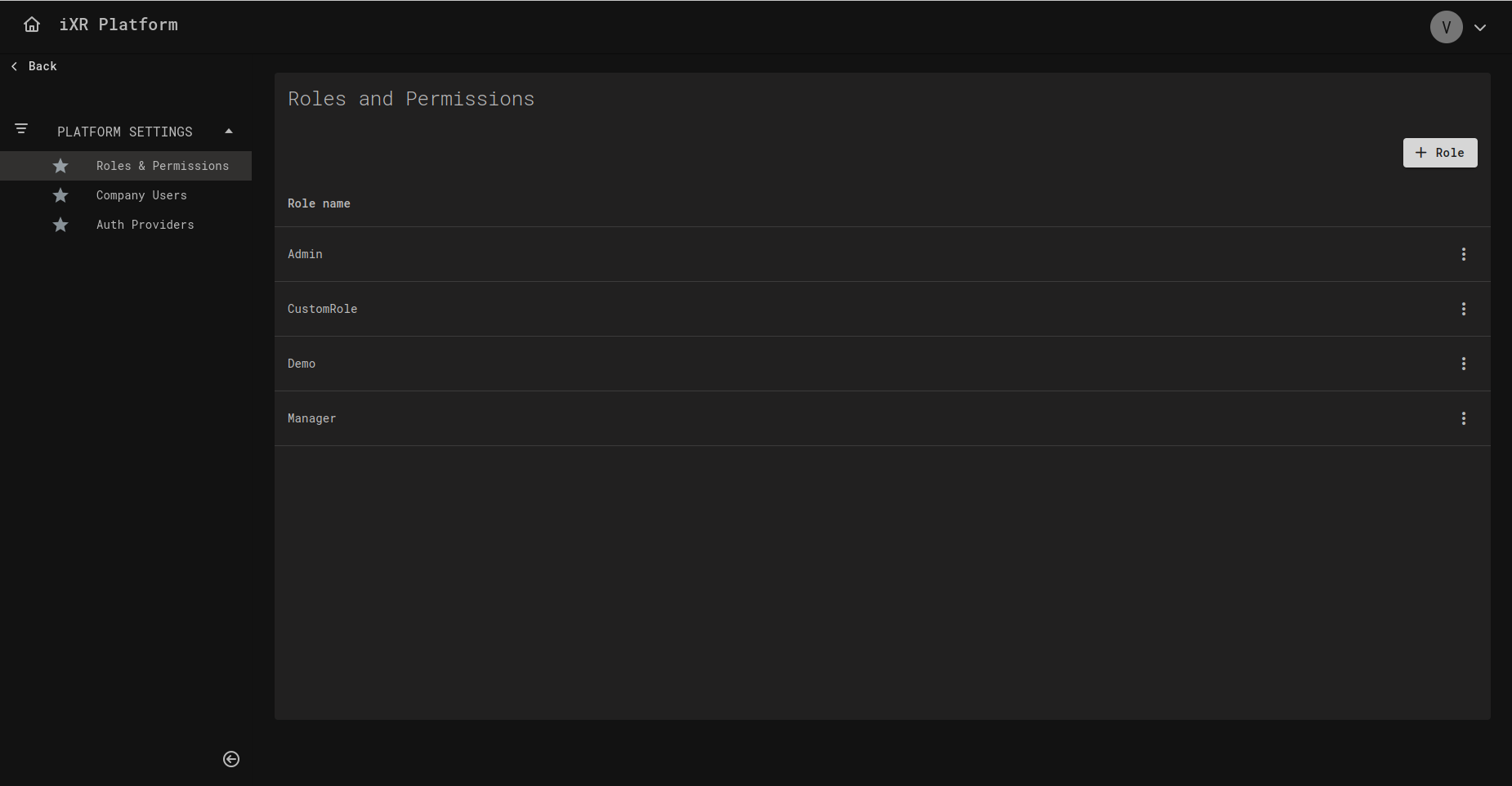
✨ Creating a Company Role
- Click + Role to open the modal.
- Enter a Role Name.
- Select the permissions to include in the role.
- Confirm to create.
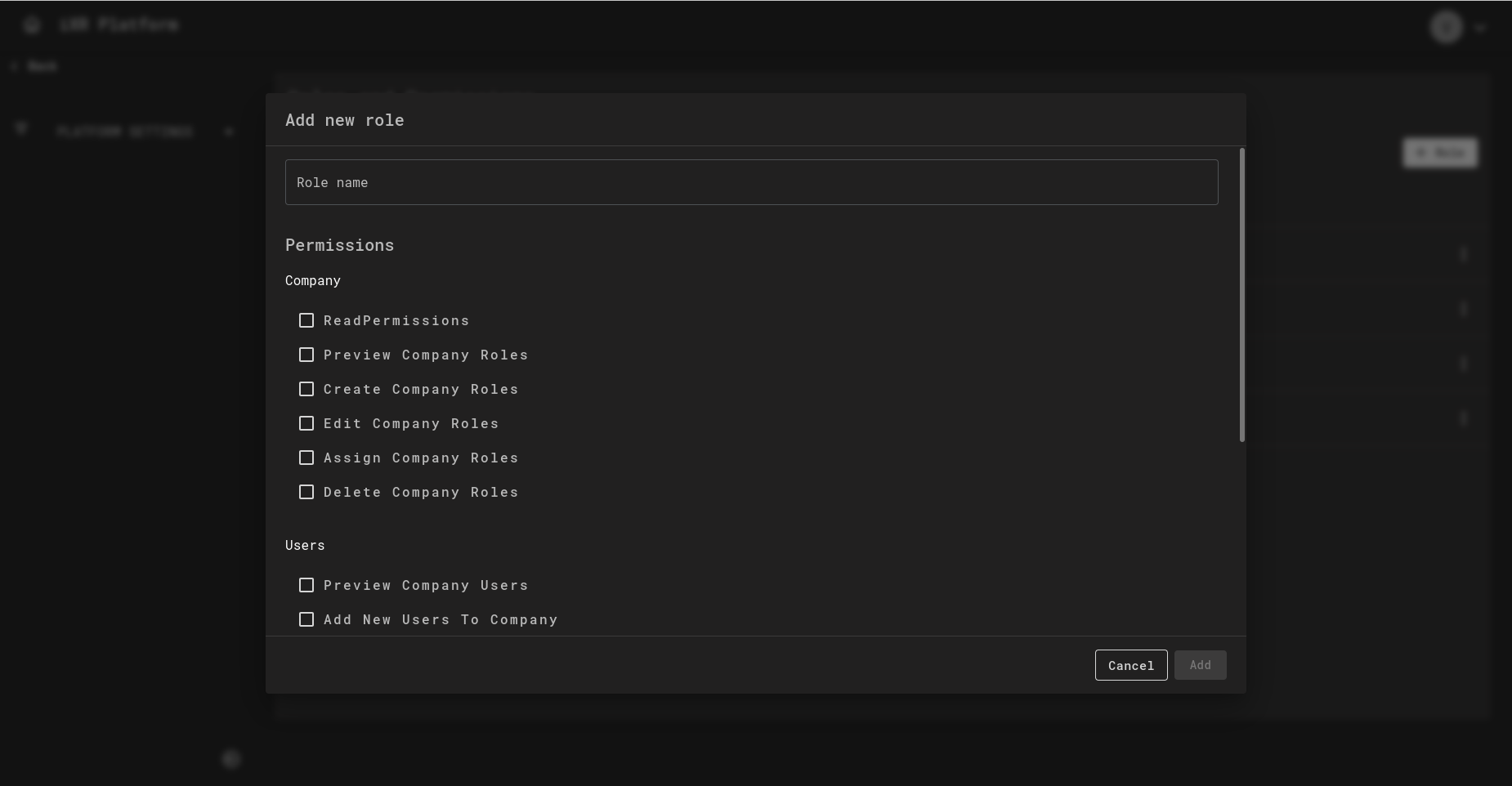
🛡️ Company Permissions Overview
🏢 Company
- ReadPermissions – View permissions list.
- Preview Company Roles – View existing roles.
- Create Company Roles – Add new company roles.
- Edit Company Roles – Update existing roles.
- Assign Company Roles – Assign roles to company members.
- Delete Company Roles – Remove company roles.
👥 Company Users
- Preview Company Users – View company members.
- Add New Users To Company – Invite new members.
- Deactivate Users – Disable member accounts.
📂 Projects
- Create New Project – Start new projects within the company.
- Delete Project – Remove projects.
🔐 SSO
- Preview SSO Settings – View authentication provider settings.
- Update SSO Settings – Configure SSO integration.
📜 Action Logs
- Read – Allows viewing of company action logs.
📦 Project Roles & Permissions
Each project has its own role and permission system. Reserved roles include Admin, Editor, and Viewer.
- 🛠️ Admin
- ✍️ Editor
- 👀 Viewer
- Full access to all project functionality. - Can create and edit roles. - Can add new users to the project and assign roles.
- Full access to project functionality. - Cannot create or edit roles. - Cannot add new users or assign roles.
- Read-only access to all project functionality.
🛡️ Project Permissions Overview
👥 Users
- Read – Allows viewing of the complete project users table, including profiles, data field values, and user settings.
- Create – Allows creation of new project users.
- Update – Allows editing of user profiles, modification of data field values, changes to user settings values, and assignment of data fields or settings.
🙍 Individual User
- Read – Allows viewing of "My Users" table and profiles, including data field values and settings.
- Create – Allows creation of your own user.
- Update – Allows editing of your own profile, modifying your own data field values, and settings.
- Share – Allows sharing your own profile with other users.
- Transfer – Allows transferring ownership of your profile to another user, giving them full control.
🧾 User Data Fields
- Read – Allows viewing of project data fields in configurations and profiles.
- Create – Allows creating new data fields.
- Update – Allows editing existing data fields.
- Delete – Allows deleting data fields and their associated values.
⚙️ User Settings
- Read – Allows viewing of project settings in configurations and profiles.
- Create – Allows creating new project settings.
- Update – Allows editing settings.
- Delete – Allows deleting settings and their associated values.
🗄️ iXR Database
- Read – Allows viewing database collections and their values.
- Create – Allows creating new collections.
- Update – Allows editing existing collections and their values.
- Delete – Allows deleting collections and their associated values.
📊 Dashboard
- Read – Allows viewing of main dashboard metrics and statistics.
📈 Metrics
- Read – Allows viewing of metrics on the analytics page.
🔧 Remote Config
- Read – Allows viewing of remote configurations.
- Create – Allows creating new remote configurations.
- Update – Allows editing existing configurations.
- Delete – Allows deleting remote configurations.
📜 Action Logs
- Read – Allows viewing of project action logs.
🌟 Features
- Read – Allows viewing of project features.
- Update – Allows editing of project features.
🔌 Plugins
- Read – Allows viewing created plugins.
- Create – Allows creating and uploading plugins.
- Update – Allows editing plugin metadata or changing versions.
- Delete – Allows deleting plugins.
📂 File Manager
- Read – Allows viewing uploaded content and folders.
- Create – Allows creating new folders.
- Download – Allows downloading uploaded content.
- Upload – Allows uploading new content (but not replacing).
- Delete – Allows deleting folders, uploaded content, and replacing content.
🔑 Role & Permissions
This section is only available in preview mode. Full access is reserved for Admins and cannot be granted to default or custom roles.
- Read – Allows viewing of roles and permissions.
- Create – Allows creating new roles and assigning permissions.
- Update – Allows updating roles and permissions.
- Delete – Allows deleting custom roles.
👤 Project Members
This section is only available in preview mode. Full access is reserved for Admins and cannot be granted to default or custom roles.
- Read – Allows viewing of project members.
- Create – Allows adding new project members.
- Delete – Allows removing project members.
✅ Best Practices for Roles & Permissions
- 🔒 Principle of Least Privilege – Always start with minimal permissions.
- 🪪 Use Reserved Roles – Prefer Admin, Editor, or Viewer unless custom access is required.
- 🛠️ Separate Concerns – Company roles for governance, project roles for execution.
- 🔄 Review Regularly – Ensure roles align with current responsibilities.
- 🚦 Restrict Critical Permissions – Limit
Delete,Transfer, and SSO settings to trusted Admins. - 🧪 Test Custom Roles – Validate new roles with a test account before assigning broadly.
💡 Business Case
A global company uses iXR Platform across multiple departments.
-
At the Company Level:
- IT manages SSO integration.
- HR invites and deactivates employees.
- Admins create company-wide roles (e.g., "Project Creator").
-
At the Project Level:
- Trainers manage VR training projects.
- Editors update lesson content.
- Viewers track trainee progress without modifying data.
This separation ensures company-wide governance while allowing project teams to work independently.