Metrics
The Metrics feature in the iXR Platform has two parts:
- Metrics Page – Explore raw metrics visually.
- Posting Metrics – Send new metrics to the API.
🖥️ Metrics Page
Use the Metrics page to filter and inspect raw metrics with a workflow similar to Grafana dashboards.
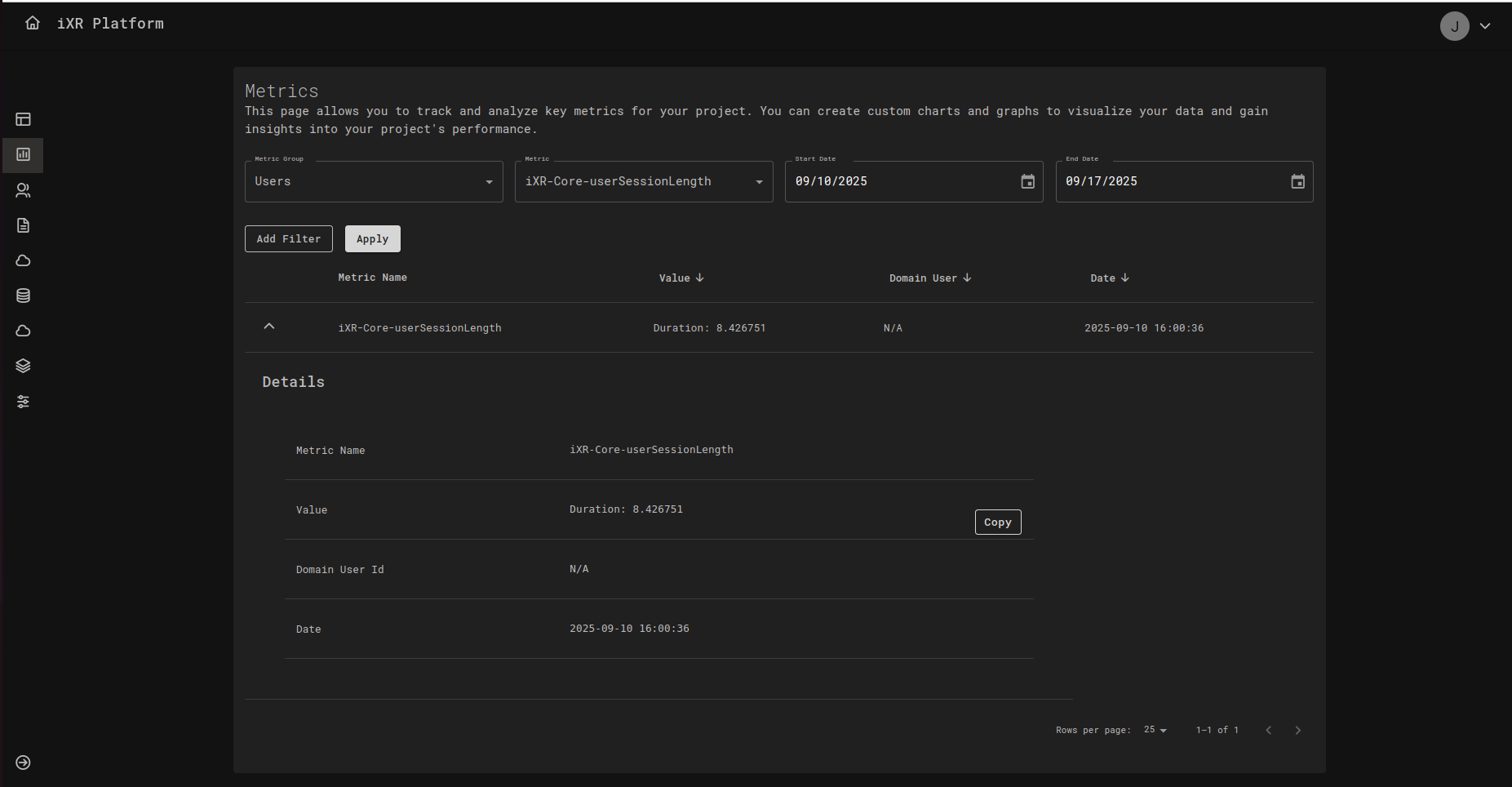
🔎 Filters & Controls
- Metric Group – Choose a group (e.g.,
Users,Sessions,SettingDeleted). - Metric – Pick a specific
metricCodewithin the selected group (e.g.,iXR-Core-userSessionLength). - Start Date / End Date – Time range for your query.
- Add Filter – Add extra key/value filters (e.g.,
DomainUserId,SessionType). - Apply – Runs the query with the selected filters.
🧱 Results Table
- Metric Name – The metric’s code.
- Value – Parsed or summarized value (e.g.,
Duration: 8.426751). - Domain User – User identifier when present;
N/Aif not applicable. - Date – Timestamp (
createdAt).
Rows are sortable (↑/↓), paginated (Rows per page), and expandable. Expanding a row opens Details, where you can:
- View the full
metricValuepayload. - Copy values for debugging or reporting.
- See normalized fields (Metric Name, Value, Domain User Id, Date).
📤 Posting Metrics
The API allows you to submit metrics from your application or users. There are two endpoints:
-
End User–Specific Metrics
POST app/api/v1/projects/{projectId}/domain/metrics/user -
General Application Metrics
POST app/api/v1/projects/{projectId}/domain/metrics
🎯 Purpose
Submit analytics data either for:
- A specific end user (user-tied events like sessions).
- The application in general (system or project-wide events).
🧾 Request Headers
Content-Type: application/json
📦 Request Body
The request body is always a JSON object with the following fields:
| Field | Type | Required? | Description |
|---|---|---|---|
metricGroupCode | string | Yes | Logical group for the metric (e.g., "Sessions", "SettingDeleted"). |
metricCode | string | Yes | Unique or descriptive identifier for the metric. |
createdAt | string | No | ISO-8601 timestamp when the metric was generated. Defaults to server time if omitted. |
metricValue | object | Yes | Key–value payload storing the metric (any valid JSON structure). |
Notes
- If
createdAtis omitted, the server sets it to the current date and time.metricValueis stored as JSONB in the database.
🧪 Example Requests
End User–Specific Metrics
{
  "metricGroupCode": "Sessions",
  "metricCode": "Session-14/05/2025",
  "createdAt": "2024-12-08T08:32:46.003Z",
  "metricValue": {
    "Start": "2024-12-08T08:32:46.003Z",
    "SessionType": "normal"
  }
}
🧭 Summary & Behaviors
⏱️ Timestamp Handling
- If
createdAtis not provided, the server defaults to the current time. - Supports both online (real-time) and offline (batched) submissions.
🗃️ Metric Value Storage
metricValueis stored as JSONB in the database.
🧮 Session Grouping
- Reports can group metrics by a
Sessionfield insidemetricValue. - Unique session IDs are recommended but not enforced; duplicates are allowed and simply affect granularity.
✅ Best Practices
Always include createdAt when posting metrics. This ensures consistency across different devices and avoids relying on server defaults.
Use meaningful metricGroupCode and metricCode values (e.g., "Sessions", "FeatureUsage") so metrics are easier to query and analyze later.
For session tracking, generate unique IDs per session. While duplicates are allowed, unique IDs improve report granularity and accuracy.
metricValueDefine a standard schema for keys inside metricValue (e.g., always use "UserId", "Device", "SessionType").
Consistency ensures metrics can be filtered and aggregated easily across different events.
Design metricValue objects with fields that can be used as filters (e.g., SessionType, Device, UserId) for easier dashboard analysis.
When operating offline, batch metrics carefully and ensure ordering is preserved before posting them to the API.
💡 Business Case
Imagine your team has launched a new feature in your VR training application. You want to measure how often it is used, by whom, and under what conditions.
- Each time a user triggers the feature, the app sends a metric event via the API.
- The
metricGroupCodecould be"FeatureUsage". - The
metricCodecould be"VR-Scenario-Start". - The
metricValuecould store details such as:
{
  "UserId": "12345",
  "ScenarioId": "Intro-Level",
  "Device": "OculusQuest2",
  "StartTime": "2025-09-17T08:30:00Z"
}